The One Setting You Need to Toggle in Google Drive Right Now
There’s a quiet little feature buried inside Google Drive that most people have never touched. Not because it’s hard to find, exactly, but because nobody ever told them it mattered. And for years, that oversight has been silently chewing through storage space, creating confusion in shared workspaces, and leaving sensitive files exposed in ways that would make most people genuinely uncomfortable if they knew.
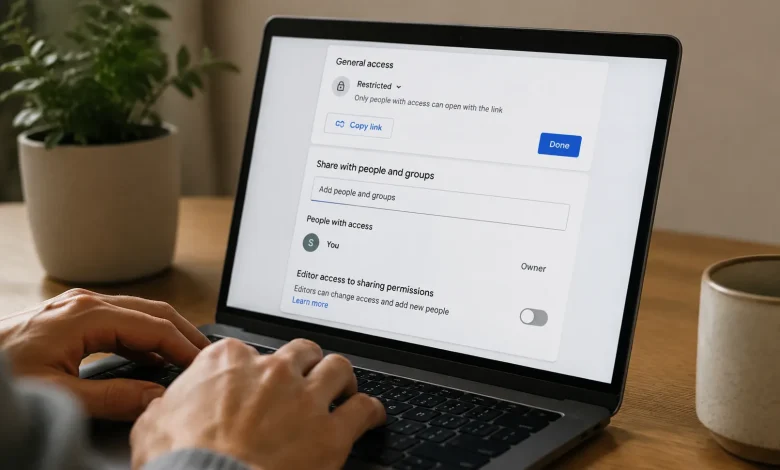
The setting is called “Editor access to sharing permissions.” And toggling it specifically, restricting it might be the single most impactful change you make to your Google Drive setup this year.
What the Setting Actually Does
By default, when you share a Google Doc, Sheet, or any file with someone as an Editor, that person can do more than just edit the content. They can also change who else has access to the file. They can invite new people, remove existing collaborators, or even make the entire document publicly accessible on the web. All without asking you first. All without you ever knowing it happened.
That’s not a bug. Google designed it that way, with the logic that collaboration should be frictionless. If you trust someone enough to edit your document, the reasoning goes, you probably trust them enough to manage its permissions too. On paper, that makes sense. In practice, it creates a surprisingly wide attack surface not necessarily from bad actors, but from well-meaning colleagues who don’t fully understand the implications of what they’re clicking.
The Scenario Nobody Thinks About Until It Happens to Them
Picture this. You’ve built a client proposal in Google Docs. You share it with two colleagues as editors so they can refine the pricing and add their notes before the big pitch meeting. One of them, trying to be helpful, shares it with a third person maybe someone in legal, maybe a junior analyst using the “Anyone with the link can edit” option because it seemed like the easiest way to loop them in quickly.
That link is now live. It’s in someone’s email thread. It gets forwarded. Six months later, a version of your confidential proposal is sitting in a folder somewhere you never intended, attached to a chain of correspondence you’ll never see.
This isn’t hypothetical. Variations of this scenario play out in companies of every size, every single day. And the root cause almost always traces back to that default permission setting nobody bothered to change.
Where to Find It and How to Change It
Here’s the thing this isn’t some obscure developer setting. It lives right inside the sharing dialog of any file you own. Open a document, click the Share button in the top right corner, and then look for the gear icon or “Settings” link that appears near the top of the sharing panel. Click that, and you’ll see two checkboxes.
The first one says “Editors can change permissions and share.” The second says “Viewers and commenters can see the option to download, print, and copy.”
Uncheck the first one. That’s it. That’s the toggle.
Once unchecked, only you as the owner can change who has access to the file. Editors can still edit. But they’ve lost the ability to invite new people or modify the sharing settings. The file’s access controls stay exactly where you put them.
You can also set this as a default behavior in Google Drive’s general settings, which means every new file you create going forward will have this restriction baked in from the start. You’ll find that option under the gear icon on the main Drive interface, under “General” settings, in the section labeled “Sharing settings.”
The Counterargument Worth Engaging With
Some people push back on this. Particularly in fast-moving teams where collaboration is the whole point, locking down permissions can feel like it slows things down. If someone needs to loop in a stakeholder urgently, having to track down the file owner just to grant access adds friction. That friction has a cost.
It’s a fair point. Workflow friction is real, and the best security measures are the ones people actually use rather than route around. If your team is small, highly trusted, and operating on tight deadlines, leaving editor sharing permissions open might genuinely be the right call for your specific context.
But “friction” is doing a lot of heavy lifting in that argument. The actual workflow impact is minimal in most cases. Granting access takes about thirty seconds when you’re the file owner. The person who needs access sends a quick message, you add them, done. That’s not a bottleneck. What is a bottleneck or worse, a liability is discovering three months after a project closed that your working documents have been accessible to twelve people you didn’t authorize.
Why This Matters More Now Than It Did Five Years Ago
Google Drive usage has expanded dramatically, and not just in volume. The kinds of files people store there have changed too. What started as a convenient place to draft meeting notes has evolved into the primary home for financial models, HR documents, legal contracts, product roadmaps, and in some organizations, genuinely sensitive personal data. The stakes attached to unauthorized access have gone up considerably.
At the same time, the hybrid and remote work shift has blurred the lines around who counts as “inside” an organization. People collaborate across company boundaries constantly now with contractors, with agency partners, with consultants who cycle in and out of projects. Every one of those external collaborators added as an editor is a potential node through which your file’s permissions can propagate in directions you didn’t anticipate.
There’s also an increasingly important compliance dimension. Depending on your industry, uncontrolled sharing of certain document types can create real exposure under frameworks like GDPR, HIPAA, or SOC 2. “We didn’t know the contractor re-shared it” is not a defense that tends to hold up well.
One Toggle, But Not the Only One
Changing this setting is genuinely useful and genuinely underused, but it’s worth saying plainly: it’s not a complete privacy solution. Google Drive has other settings worth examining. The default link-sharing behavior when you first create a document is it set to restricted, or to anyone in your organization? Expiration dates on shared links are another feature almost nobody uses but can be valuable for time-sensitive materials. And periodic audits of who has access to your most important files are worth scheduling, even if it’s just once a quarter.
What makes the editor-sharing-permissions toggle worth calling out specifically is the ratio of impact to effort. It takes about thirty seconds to change. Its effect is immediate and persistent. It closes off a category of accidental exposure that people almost never think to guard against until something goes wrong.
Most people manage their Google Drive the way they manage a junk drawer functional enough that they’ve stopped questioning it. But junk drawers don’t usually contain your client lists or your company’s unreleased product strategy. Drive does. And the settings you leave on their defaults are, in a quiet way, a choice. They’re just a choice you haven’t made consciously yet.
Now you have the information to make it deliberately.