How I Turned My Messy Notion Workspace into a Frictionless Productivity Machine
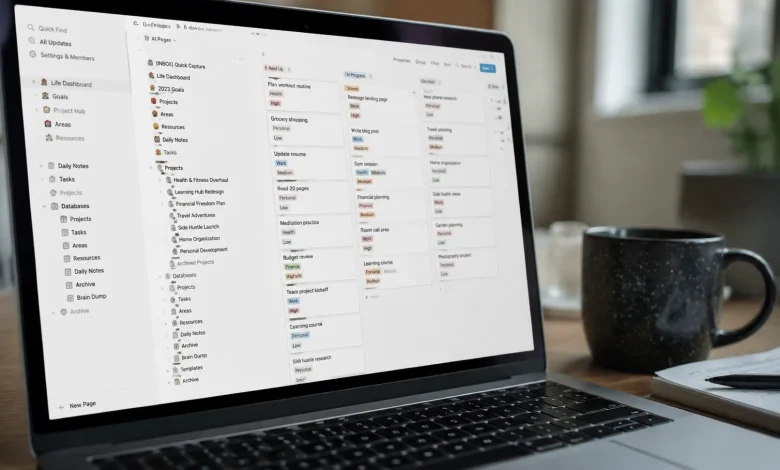
There’s a particular kind of shame that comes with opening a productivity app and feeling immediately overwhelmed. You built this system yourself. You chose every template, named every database, color-coded every tag. And somehow, despite all that effort, the whole thing collapsed into a digital junk drawer. That was my Notion workspace for the better part of two years.
I had pages nested inside pages like a Russian doll of procrastination. Databases that tracked tasks I’d long since abandoned. A “life dashboard” that hadn’t been touched since the week I built it in a burst of late-night optimism. Every time I opened Notion to actually get something done, I’d spend the first ten minutes just trying to remember where I’d put things. It wasn’t a productivity system. It was a monument to the idea of being productive.
The turning point wasn’t a revelation. It was exhaustion.
Why Notion Gets Messy So Fast
Notion’s flexibility is both its greatest feature and its most dangerous trap. Because you can build anything, you end up building everything. You start with a simple task list, then add a content calendar, then a reading tracker, then a habit log. Each piece makes sense in isolation. Together, they create a labyrinth.
Most productivity advice skips over this structural problem. The conversation is always about which template to use or how to set up a GTD system inside Notion. What nobody talks about enough is the psychological weight of navigating a workspace that doesn’t respect your cognitive bandwidth. Every unnecessary click, every misnamed page, every database that almost fits your needs but not quite all of it adds friction. And friction, over time, makes you avoid the tool entirely.
I’d fallen into the classic trap of treating my workspace like a creative project. I was more interested in designing the system than using it.
Starting Over Without Actually Starting Over
The instinct, when things get bad enough, is to delete everything and start fresh. I’ve done that three times. Each time, I rebuilt the same mess with slightly prettier aesthetics. The problem was never the pages or the databases. It was my relationship with the tool specifically, how I was adding to it without ever subtracting.
The approach that finally worked was a kind of aggressive archeology. I didn’t delete anything immediately. Instead, I created a single page called Archive and moved everything into it. Everything. My entire workspace became a blank sidebar with one page: a simple inbox.
This was uncomfortable. It felt like I was losing something. But what I was actually losing was the cognitive overhead of managing a system too large to hold in my head. The archive wasn’t a graveyard. It was a holding space. Anything genuinely useful would surface again when I needed it. Anything that didn’t surface within sixty days got deleted for real.
In practice, I revisited maybe fifteen percent of what I’d archived. The rest had been noise disguised as organization.
The Three-Layer Architecture That Changed Everything
After clearing the slate, I rebuilt around a principle I borrowed loosely from architecture: form follows function. I stopped asking “what does this workspace look like?” and started asking “what do I actually need to find, and when?”
The answer, when I was honest with myself, was pretty narrow. On any given workday, I needed to know what I was working on today, what projects were in progress, and where to put new information so it didn’t get lost. That’s it. Three layers.
The first layer is a daily note not a template, just a fresh page I open every morning with the date as the title. I write down the three things I need to complete that day and anything I’m thinking about. It’s intentionally low-structure. If I need to reference something, I link it. If an idea comes up, I write it here first. The daily note is where work happens. Everything else in Notion is storage.
The second layer is an active projects database. Not all projects active ones only. Anything I’m not actively working on in the next two weeks gets moved to a separate archive database. The active list stays short enough to read at a glance. Each project has exactly one linked page where all the notes, assets, and context live. No sub-databases, no nested pages beyond one level.
The third layer is reference. This is where I keep everything that isn’t a task or a project: research, templates, saved articles, meeting notes. I used to organize this obsessively by category. Now I barely organize it at all I rely almost entirely on Notion’s search. The irony is that a flat, lightly organized reference system is far more useful than an elaborate taxonomy I have to maintain. Search beats folders, almost every time.
The Habits That Keep It Clean
A good architecture will decay without good habits. I’ve learned this the hard way. The system you build on a Sunday afternoon will not maintain itself through a busy Thursday.
The habit that matters most is what I call the daily refile. Every evening, before I close my laptop, I spend about five minutes moving anything that landed in my inbox to wherever it actually belongs. It almost never takes longer than that. But skipping it for three days in a row is how you end up back in chaos.
The second habit is a monthly review of active projects. Not a deep audit just a five-minute scan. Anything that hasn’t moved in three weeks either gets a concrete next action assigned to it or gets archived. This prevents the creeping accumulation of stale projects that made my old workspace feel so heavy.
I also stopped trying to capture everything in Notion. This was a harder habit to break than I expected. For a long time, I believed that a good productivity system should be the one place where everything lives. But that belief was making my workspace unwieldy. Now I use Notion specifically for projects and reference material that requires context. Quick tasks go in a simple to-do app. Voice memos go in my phone’s native recorder. Not every piece of information deserves a Notion page.
What Frictionless Actually Feels Like
The word frictionless gets overused in productivity circles until it means almost nothing. Let me describe what it actually felt like in practice, a few months after rebuilding.
I stopped dreading opening Notion. That sounds small, but it wasn’t. For two years, there had been a barely-conscious resistance every time I clicked the app a background awareness that I was about to navigate something complicated before I could do anything useful. That resistance disappeared. The workspace became neutral, which is exactly what a tool should feel like.
My daily note loads in under two seconds, and I can read the whole thing without scrolling. My active projects list has seven items on it right now. When someone sends me something to review, I know exactly where to put it. When I need to find something I saved six months ago, I type three words in the search bar and it surfaces.
None of this is revolutionary. The underlying insight is almost embarrassingly simple: a productivity system only works when the cost of using it is lower than the cost of not using it. When the system becomes the work, you’ve already lost.
The messiest workspaces are usually built by the most ambitious people. The ambition to track everything, to systematize everything, to leave no information unorganized. I understand that impulse completely. But the workspace that actually serves you is the one that knows what to leave out.